

Eventually, you’ll want to make use of a link shortener. There are lots of reasons: convenience in sharing and privacy are just two top reasons. If you’ve ever shared a Microsoft Teams invite via text message, you’ll wish you had a link shortener handy. But beware: the “free” link shorteners, like bit.ly, are harvesting your clicks and invading your privacy.
It’s best to just run a shortener yourself. My choice is shlink which bills itself as the “definitive self-hosted URL shortener.” And it is, indeed, wonderful at what it does.
shlink can be remarkably easy to deploy. All you need to get started is a Docker environment of some kind and a domain you control. You need deploy only a single container to run the shlink back end which you can access via the public and lovely shlink web UI.
That’s how I got started…but that deployment is not the focus of this post. While the simplest deployment (just a single container and the free hosted web app) is fully functional, I had two issues with that architecture.
First, the all-in-one back end shlink container also contains the SQL database that stores the shortened links. That means you cannot easily update that container when and if you need to, say, for a security update. shlink is PHP based and as anyone who runs PHP knows, you really must be able to update quickly and easily when the next and inevitable CVSS score of 9.8 happens in PHP.
Second, I’m a fan of self-hosting. Sure, it costs more and is more complex. But it’s the ultimate in control and safety. Self hosting, done correctly, is also the best teaching environment you’ll ever encounter.
Here’s a schematic of how I’ve installed shlink.
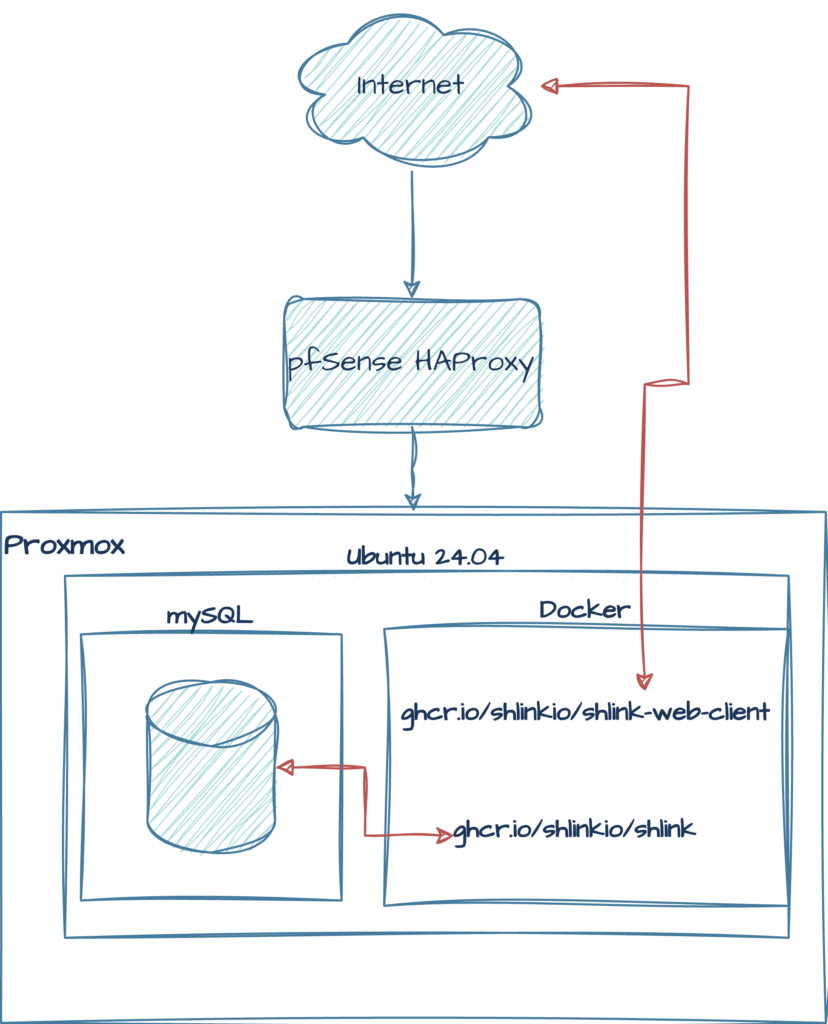
And here are some notes on this kind of deployment:
- Never expose a container or VM to the public internet. Here, shlink is running in Docker on an Ubuntu server on a Proxmox node, safely behind pfSense’s HAProxy. (In fact, it’s double-proxied).
- mySQL is installed on the VM and the shlink container is configured to use the “external” database.
- Apache is installed as the proxy for the two containers (shlink’s back end and the web client).
- TLS certificates are from Let’s Encrypt. For convenience, I created a single cert with both the back end and the web client’s SNIs included in the cert.
If you’ve read this far, I assume you’ve got a virtualization environment, know how to set up your network edge to secure traffic inbound to shlink, TLS certificates, Linux VMs, MySQL, Docker and Apache (the shlink docs appear to favor nginx but I am an Apache2 fanboy).
So, here are three “starter” configurations you might work from to build a shlink environment like the one above.
First, is the Docker Compose file. Then I’ve posted the two Apache2 virtual hosts you would enable to proxy inbound traffic to shlink. If you use them as models, be sure to change the invalid names and credentials in the versions posted here.
version: '3.8'

services:
  shlink_app:
    image: ghcr.io/shlinkio/shlink
    container_name: shlink_backend
    network_mode: "host"
    environment:
      - DEFAULT_DOMAIN=s.example.com
      - IS_HTTPS_ENABLED=true
      - GEOLITE_LICENSE_KEY=YOUR_KEY_HERE
      - DB_DRIVER=mysql
      - DB_USER=shlink
      - DB_PASSWORD=YOUR_PASSWORD_HERE
      - DB_HOST=127.0.0.1
      - SHELL_VERBOSITY=3
    restart: always

  shlink_web_client:
    image: ghcr.io/shlinkio/shlink-web-client
    container_name: shlink_web_client
    ports:
      - "8088:8080"
    environment:
      - SHELL_VERBOSITY=3
    restart: always
Here’s an Apache virtual host definition for the shlink backend.
<IfModule mod_ssl.c>
<VirtualHost *:443>
    ServerName s.example.com
    ServerAlias shlink-backend.example.com

    ProxyPreserveHost On
    ProxyRequests Off

    # Pass the client IP address to Shlink for geolocation.
    RequestHeader set X-Forwarded-Proto "https"
    RequestHeader set X-Real-IP "%{REMOTE_ADDR}s"

    ProxyPass / http://127.0.0.1:8080/
    ProxyPassReverse / http://127.0.0.1:8080/

    # SSL/TLS configuration
    SSLEngine on
    SSLCertificateFile /etc/letsencrypt/live/shlink.example.com/fullchain.pem
    SSLCertificateKeyFile /etc/letsencrypt/live/shlink.example.com/privkey.pem
    Include /etc/letsencrypt/options-ssl-apache.conf
</VirtualHost>
</IfModule>
And, finally, here’s an Apache virtual host definition for the web client container.
<IfModule mod_ssl.c>
<VirtualHost *:443>
    ServerName shlink.example.com
    ServerAlias shlinkui.example.com

    ProxyPreserveHost On
    ProxyRequests Off

    # Pass the client IP address to Shlink for geolocation.
    RequestHeader set X-Forwarded-Proto "https"
    RequestHeader set X-Real-IP "%{REMOTE_ADDR}s"

    ProxyPass / http://127.0.0.1:8088/
    ProxyPassReverse / http://127.0.0.1:8088/

    # SSL/TLS configuration
    SSLEngine on
    SSLCertificateFile /etc/letsencrypt/live/shlink.example.com/fullchain.pem
    SSLCertificateKeyFile /etc/letsencrypt/live/shlink.example.com/privkey.pem
    Include /etc/letsencrypt/options-ssl-apache.conf
</VirtualHost>
</IfModule>

Leave a Reply