

This is a post about using PowerShell to manage Exchange email aliases. But it’s also about AI and vibe coding and the future of IT development.
Let’s start with the bottom line.
About a year and half ago, I wrote a post featuring a “hobby script” (one only the author could love) that allowed rudimentary management of Exchange Online email aliases in an Exchange mailbox. Aliases allow an admin to assign a number of different non-primary email addresses to a user’s mailbox. Recent versions of Outlook (even on the Mac!) allow users to send outbound email from aliases. It’s like SMTP plus addressing, only better.
Over the last few months, I found myself using that script more and more. Exchange Online aliases are so useful — and poorly exposed to admin control. It occurred to me that my sad little script might be more useful to me and others if it was a PowerShell module available in the PowerShell Gallery.
But it’s work to package up a script one wrote for convenience as something someone else might want to use. You need to prep a module to work the way PowerShell cmdlets do, doc it and (ideally) load it up to a public GitHub repo. Then, one needs a GitHub Action to build versions of the module and export them to the PowerShell Gallery.
Would this be a good task for AI? Could some time spent iteratively improving the original script yield something worth making public?
My answers are an unqualified, “Yes!”
To start, using Claude Sonnet 4.5 is amazing. In less than about 10 hours, that amateurish little script I posted a year ago blossomed into a very complete module, which you can use by simply importing it into a PowerShell console with Install-Module -Name ExoAliasManagement.
The vibe coding experience was, in a word, revealing. Using my preferred development environment (VS Code and GitHub Pro on macOS), Claude (and sometimes ChatGPT 5.1-Codex) produced an astonishing amount of useable code — some of it working so well it seemed the LLMs could read my mind. AI-based development today is so feature-rich, it even can produce graphic documentation like the GitHub Actions workflow illustration here.

If you look at the module file itself, you’ll see that Claude built an impressive array of error-checking code and modularized the module’s functions quite well. It documented everything beautifully and, much to my amazement, generated a very-nearly-complete YAML GitHub Action workflow that could be invoked from the local clone of the repo. Now, that’s productivity.
Here, for example, is an interaction in which I query Claude about a mismatch between what it generated in the module manifest and what I asked it to place in the module definition itself. Claude made the original error of omission by not specifying the PowerShell edition — but I really appreciate its explanation of the correction.
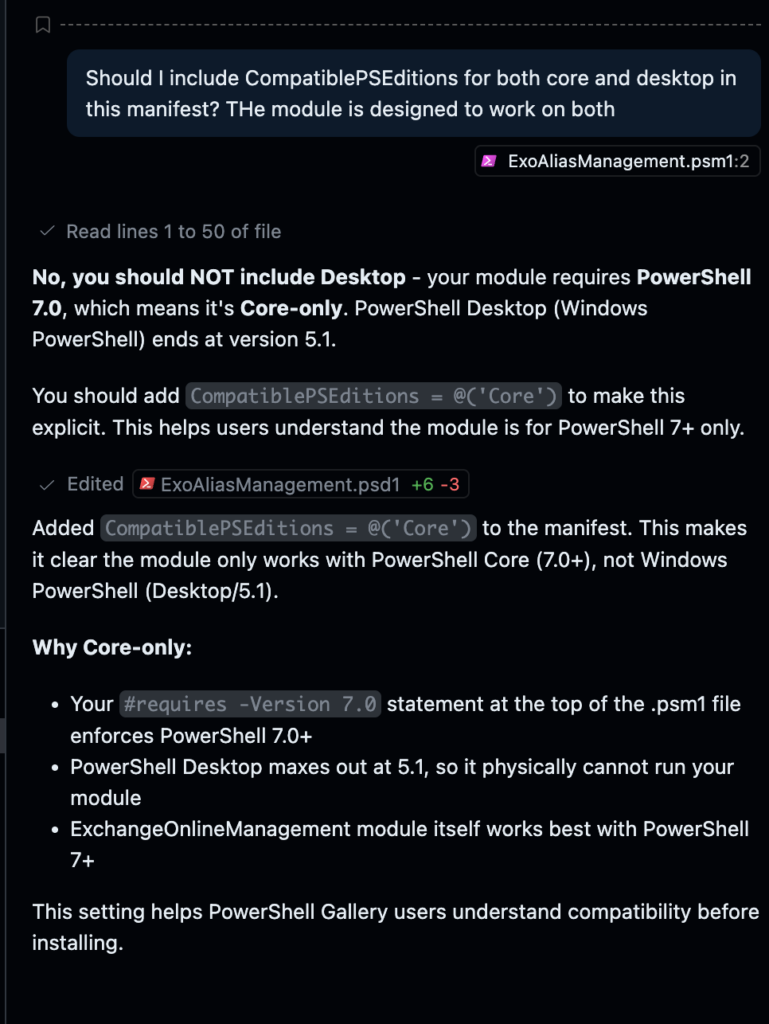
But…but…while the output of AI vibe coding is impressive it must be very carefully monitored and assessed by a living, breathing developer. It would be very dangerous to put something crucial into production without a complete forensic analysis of what the AI produced. You cannot trust code that you haven’t looked into every nook and cranny of even if you have high confidence in the AI.
That’s because AI makes mistakes and (often) writes bad code.
Over the course of the development process, I noticed that Claude could be stubborn — insisting for example that PSObjects that are pushed onto the pipeline for piping into another function (Find-ExoAlias [email protected] | Remove-ExoAlias) must be displayed on the console. Not true. But when I fixed that, Claude then noticed and offered to make my construction better. It was as if it had no earthly idea what I was asking for — and then when shown, was instantly the world authority on suppressing console output.
There’s also the question of style. While Claude can document every line, sometimes the PowerShell code it generates is like nothing a human would write. I especially noticed this when using Sort-Object. Claude got it right — but I had to read the doc three times to understand how it worked. And in decades of PowerShell development, I’ve never seen Sort-Object used that way.
Another example: Claude likes using regex strings for string comparisons. Most developers find regex inscrutable. I can only recall using regex in PowerShell once, almost a decade ago.
Over time, as an AI-generated code base evolves, it’s likely to become both more machine-like and less understandable to a human. Coupled with AI’s tendency to be stubborn and make mistakes, this could become one helluva problem.
But, as Devo once titled its second album: Duty Now for the Future. If you’re a developer, you need to adapt to this new evolution of our craft immediately. You’re job isn’t going away — but the toolset you will use is going to massively change the way you go about coding.
And, in the meantime, I hope those of you who are Exchange admins find the module Claude and I coded useful.
Leave a Reply